
Your role
Sales
Partner.
You sell and deploy chargers and earn on every paid session at the pay-to-use ones, for as long as they run. This is how you join, how you submit an install, how the rate is set, and how you keep it moving.
Joining the program
Apply at evinitiative.com/partners. The form asks for your name, your business, your electrical licence and the state or province it is held in, your service area, and roughly how many installs you expect a month.
A person reads every application and replies within two business days. Approval triggers your provisioning invite and you are live. There is no instant signup here on purpose: a commission that runs for the life of a charger is worth a conversation first.
Every licence, certification, registration and permit required to sell, install and service electrical equipment in each place you work. Commercial general liability insurance of not less than two million dollars per occurrence, naming the site host as an additional insured on every job, and EV Initiative and the charger owner as well on jobs we send you. Workers’ compensation where it is required. A 12-month warranty on your workmanship for every install, on top of the manufacturer’s hardware warranty. We may ask for your certificate before any job starts.
Submitting a charger to the network
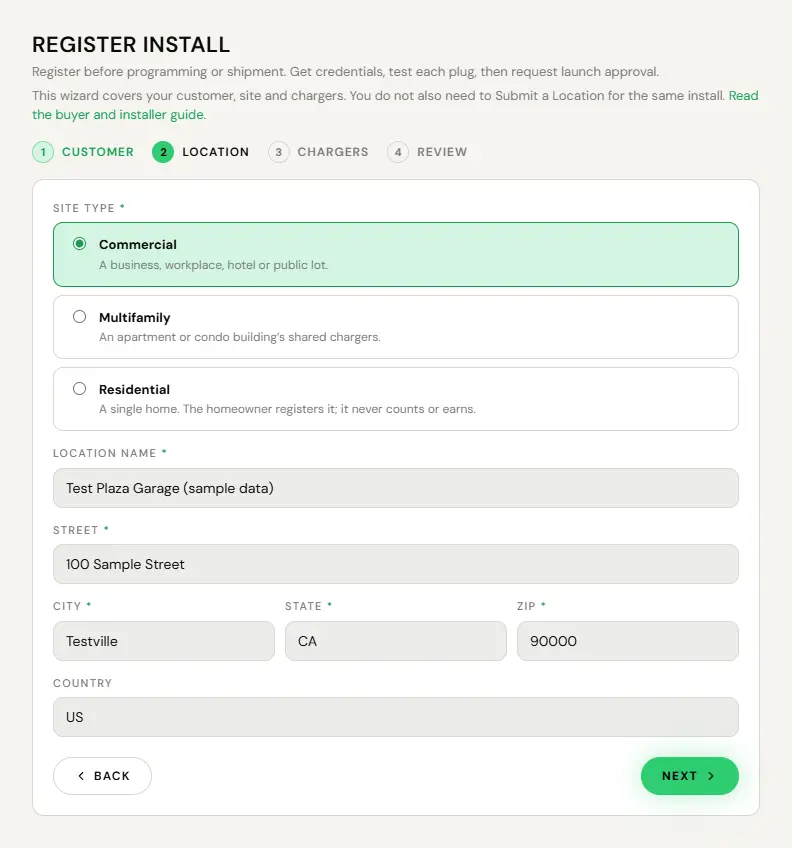
You register installs you originated yourself, from your own login. For a home, the homeowner registers the charger from their own app. For an EV Initiative job, EV Initiative registers it and assigns you as the installer. The wizard takes the customer, the site address, and each charger’s serial, and it creates the charger record before the hardware has ever connected. That is what makes the next part work.
- Open Register Install.
- Enter the customer and the site address. The address is autocompleted and geocoded, so do not hand-type the state.
- Enter each charger’s serial. The wizard asks for it as printed on the unit, and it becomes the charger’s OCPP identity, so check it character for character against the identity in the unit’s own configuration before you submit.
- Submit. The install appears on My Installs and is attributed to you when EV Initiative approves its launch.
- Program the unit with the connection details from your approval email and power it up.
The customer gets their own operator console by invite. You do not have to run it for them.
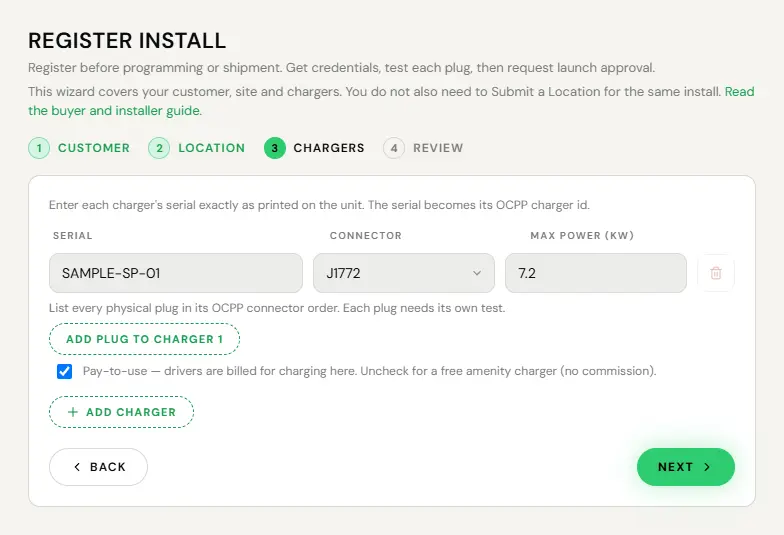
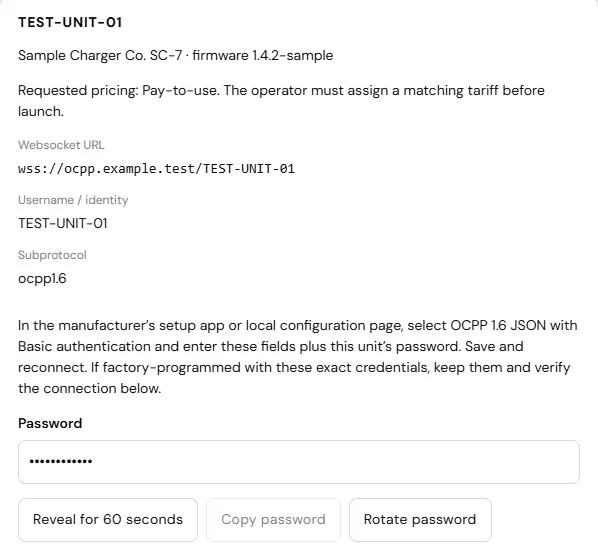
The charger identity is whatever the hardware announces. If it is typed twice and the two do not match, the unit is refused at the socket and becomes permanently unreachable, with no error anywhere. It simply never appears. Copy and paste it from the unit’s own configuration, every time. If a charger you installed never shows up, this is the first thing to check and it is usually the answer.
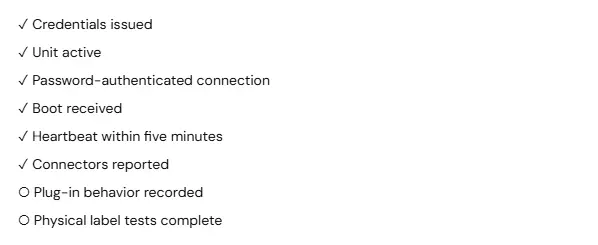
There is no provisioning step and no ticket. The moment the unit points at the network and powers up, it announces itself. Commissioning finishes on site: a tested plug-in, then launch approval, and the charger is live.
How your rate is set
As a Standard Partner you earn 3% of every paid session on every qualifying charger. There are no steps: your first charger and your hundredth earn the same rate. Commission switches on when your fourth qualifying charger launches, your first three earn from then too, and it is never retroactive.
| Charger | Standard rate |
|---|---|
| Every qualifying charger | 3.00% |
A charger counts when four things are true: you originated the site, it is not at a home, EV Initiative approved its launch, and it launched on a paid tariff. A free charger does not count toward your ordinal and does not earn, because commission is a share of a payment. An install EV Initiative assigned you does not count or earn.
The rate recorded against a charger when it launches stays with that charger for its whole life. If we ever change the rates, the change applies only to chargers deployed after it takes effect, and we will not reduce the rate recorded against a charger you have already deployed.
Commission accrues on money that actually cleared. Not on a session that was started, not on one that was authorised, but on a payment that settled. A refunded or charged-back session reverses the commission against your future accrual.
The day your fourth qualifying charger launches, an email tells you commission has switched on, because you should learn it from us rather than from a statement.
Golden Partner
Golden is for partners who deploy at volume. Enrolment is a one-time $10,000, with no annual fee, after a person reviews your application. An EV Initiative operator records it; it is not self-serve. Enrolment waives the fourth-charger start, so commission begins with your first qualifying charger after you enrol.
| Charger, by lifetime count of qualifying chargers | Golden rate |
|---|---|
| 1 through 49 | 3.50% |
| 50 through 99 | 4.00% |
| 100 through 149 | 4.50% |
| 150 and above | 5.00% |
Golden rates apply to qualifying chargers launched after you enrol. The count is your lifetime count of qualifying chargers: the ones you deployed before enrolment move you along it, and enrolment does not restart it. Chargers already live keep the rate they were stamped with. Golden counts the same chargers Standard does, and launch approval still applies.
A Golden Partner who has launched sixty qualifying chargers since enrolment, and none before it, holds forty-nine earning 3.50% and eleven earning 4.00%, side by side, and each keeps its rate.
Crossing 50, 100 and 150 qualifying chargers sends you an email the moment your Golden rate steps up.
Staying active
The program has one activity requirement: eight new qualifying chargers per rolling twelve months to stay active.
Falling inactive stops new deployments and your count stops advancing. It does not take away what you have already earned: chargers already deployed keep accruing at their recorded rates, and we keep paying them on the regular cycle. The requirement exists so the program is a deployment partnership rather than a list of people who did one install in 2024.
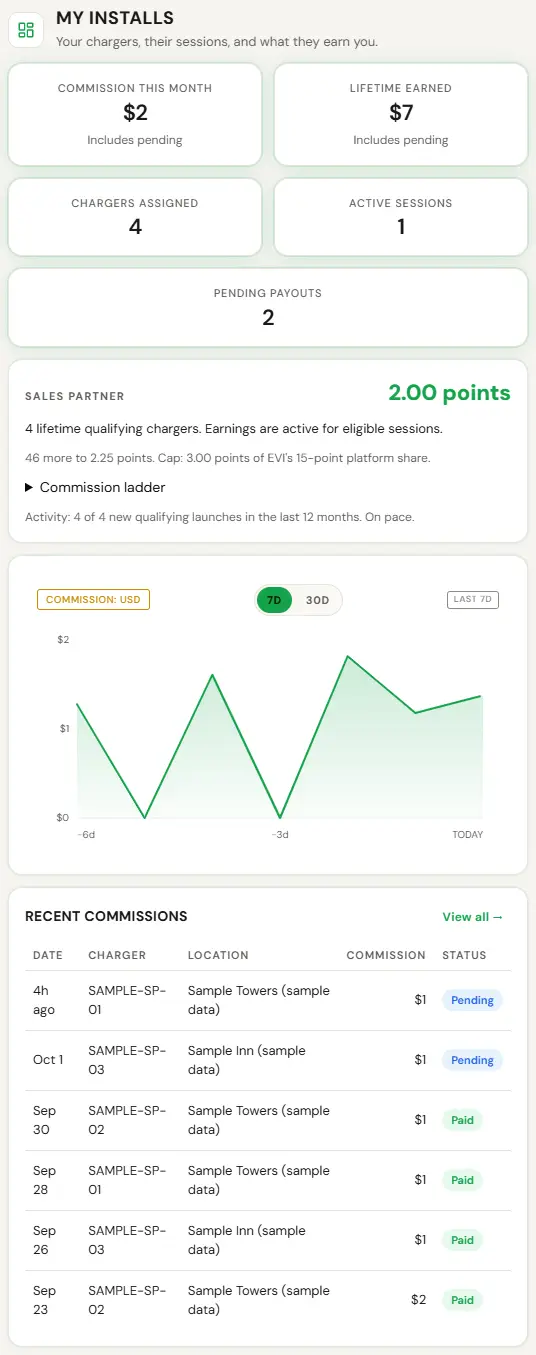
- Open My Installs.
- Read chargers assigned and your deployment history.
- Count your qualifying chargers launched in the last twelve months.
Tracking what you earn
You get a live dashboard, not a monthly statement. A statement tells you what happened. A live view tells you what to do next.
- My Installs. Commission this month, commission lifetime, chargers assigned, active sessions, pending payouts, a commission chart, and a map of your sites. The recent ledger shows date, session, commission and status.
- My Chargers. Every charger you deployed, its display name, its location, the rate stamped on it, whether it is online, and when it was last seen.
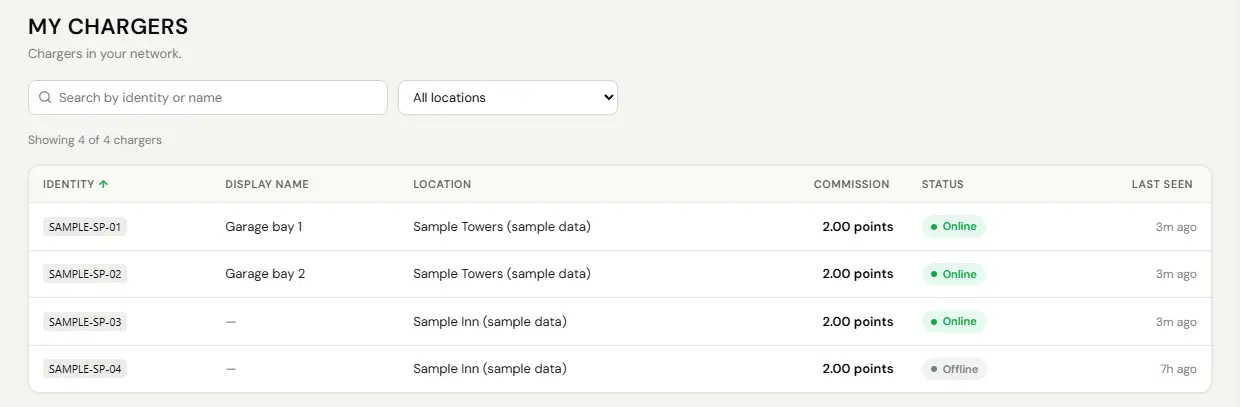
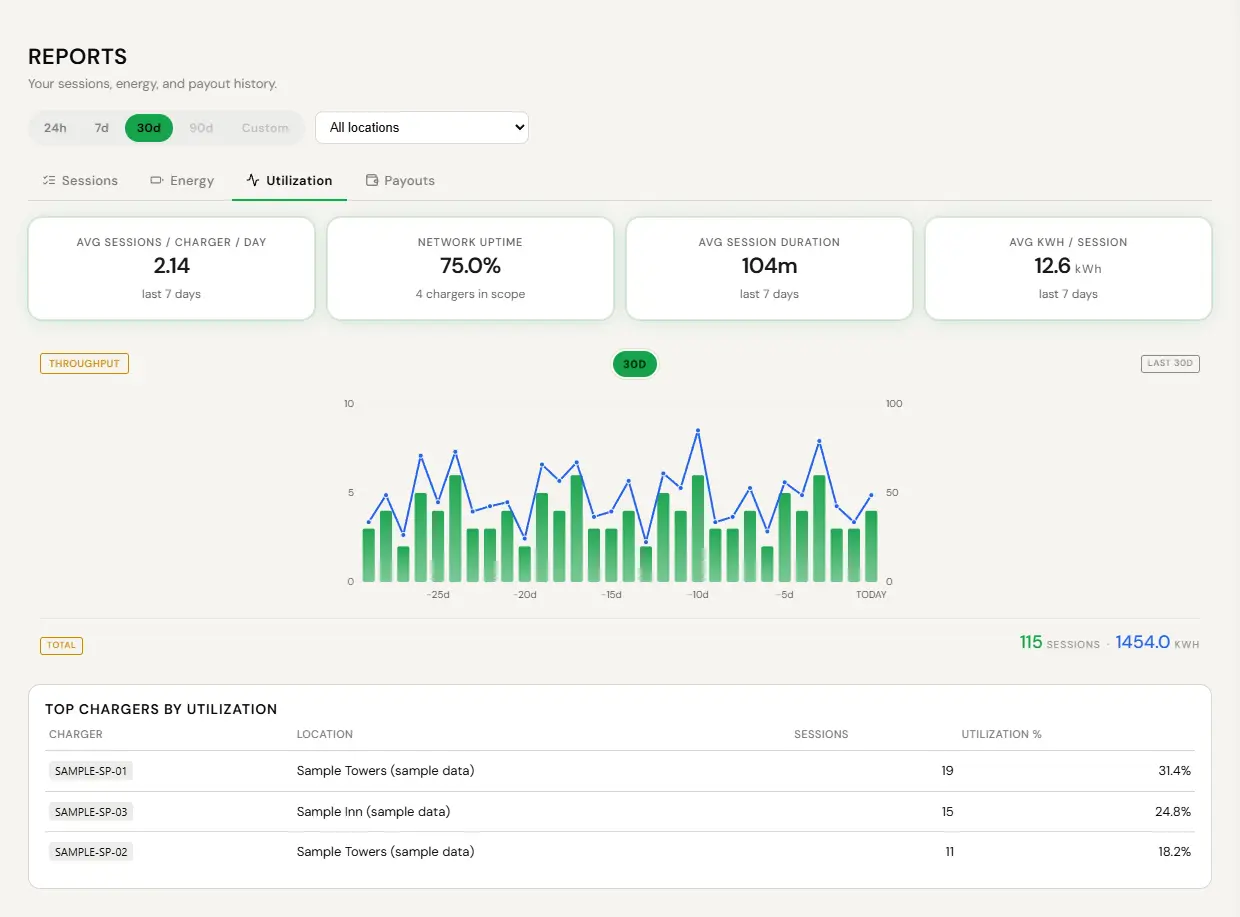
My Chargers: each charger’s location, the commission rate stamped on it, its status and when it was last seen. Captured before the rates of 28 October 2026, so the rate shown is out of date: Standard is now 3%. Sample screen with test data. - Reports. Sessions, energy, utilization (with network uptime) and payouts, for 24 hours, 7 or 30 days. Sessions and Payouts export to CSV. Commission has its own Commissions page. The Reports page covers the mechanics.
- Open Reports and the Utilization tab.
- Compare sessions and energy across your sites.
- Export the Sessions tab to CSV if you want it next to your install costs.
The second question is the useful one. A charger that never runs is a customer conversation, not a platform problem.
A monthly summary shows what your installed base earned, by site. Review statements promptly: absent a manifest error, a statement is final ninety days after it is issued.
Getting paid
Commission lands through your own Stripe Connect account. No invoicing, no reconciling, no monthly request.
- Use the Set up payouts banner at the top of your pages.
- You are handed to Stripe. They ask for your legal name, address, tax number, identity verification and a bank account.
- Finish it and you are returned to EV Initiative.
Commission accrues while onboarding is incomplete and is held, not lost. The moment Stripe confirms you, everything held settles automatically without you doing anything else.

The full Stripe walkthrough, including what happens if verification is pending or fails, is on the connecting your bank page. For changing bank details later, use Open Stripe Dashboard on the Payouts tab of Reports.
What the program is not
- Not a referral scheme. You deploy hardware and you are paid on what it produces. Nobody is paid for an introduction.
- Not paid on home installs. You get the install job and introduce the homeowner to the network. The homeowner registers the charger for monetization themselves, and no partner commission applies.
- Not paid on installs EV Initiative sources. When EV Initiative calls you in to install at a site it found, that is installation work, not origination.
- No territory exclusivity. None is offered, to you or to anyone else.
- No income projection. The rate is knowable. The volume is yours. We will not quote you a monthly figure and you should distrust anyone who does.
- No cut of your hardware. You buy at MSRP, set your own price to your customer, and keep the whole margin. We pay no rebate on hardware and take nothing from your markup.
- Not a licence to speak for us. You are an independent business and you do not represent EV Initiative.
Chargers registered without a genuine operating customer. Chargers deployed to an entity you or a related party control in order to advance your deployment order. Sessions generated other than by genuine charging use. Any arrangement structured to create the appearance of deployment or usage. We audit, and where termination is for this reason accrual stops entirely rather than surviving.