
Operator Manual
You own the chargers.
Here is how you
run them.
Everything an operator can do on the EV Initiative network, written so you never have to ask us how. Every job on every page appears twice: the way you click through it, and the sentence that makes EVII™ do it for you.
What you own, what we run
You own the chargers. That does not change, and it is the reason the rest of this works the way it does. Stop paying us and you keep the hardware, keep your data, and take both wherever you like.
What we run is the operation. Drivers arrive, sessions start, cards get charged, money lands in your bank, a charger goes quiet and somebody notices inside a minute. None of that should need a person on your staff, and none of it does.
$8 per charger per month. A dual-port unit is one charger, so it is still $8. Load management is $4 per managed charger where your service needs it. You keep 85% of session revenue. Hosts pay no per-session fee, no setup fee and no term.
Everything else in this manual is detail underneath that sentence.
Which kind of operator you are
The console shows you what your role allows, so two people reading this manual will not see the same screens. Find yourself below and start there. Each one is a complete walkthrough of that job and nothing else.
Roles decide what you can do. Scoping decides where. A regional manager and a building admin can hold the same role and see entirely different networks. Nobody can grant a role or a scope above the one they hold, and that is enforced on every request rather than by hiding a menu.
Everyone, whatever their role, needs two more things: a bank account connected through Stripe before any money can move, and the app on their phone so an offline charger reaches them before a resident does.
Two ways to do everything
Every task in this manual is written twice, side by side. On the left is the click path, for when you want to see it happen. On the right is what to say to EVII™ instead.
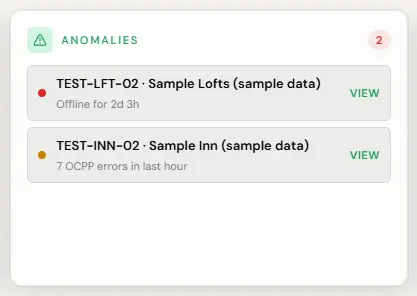
- Open Overview, Dashboard.
- Read the Anomalies card. Anything red needs you today.
- Click through to the charger for the detail and the message history.
She answers inside your own permissions and nobody else’s. She cannot see another operator’s network, and she cannot give herself or you any access you do not already hold.
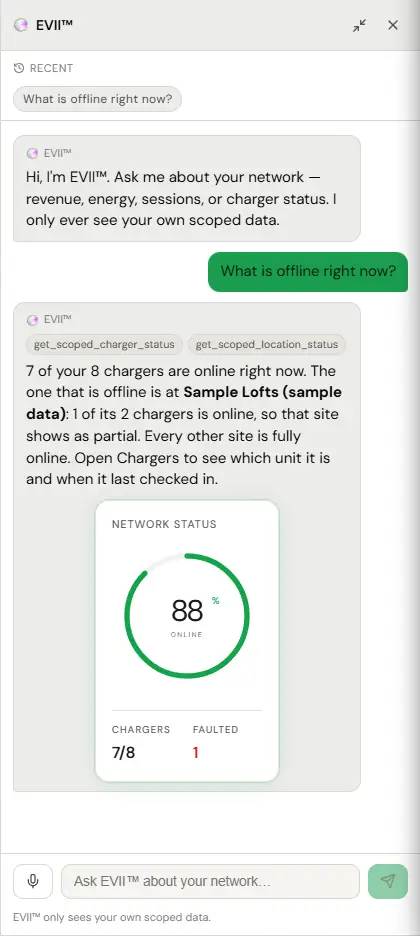
Anything that changes something, she proposes first and waits for you to confirm. Anything that only reads, she just answers. That split is in the code rather than in her instructions, which is why it holds.
Where everything is
- Your first week. What to do in order, from the invite to the first paid session.
- Get it on your phone. Both apps install to a home screen. Two taps on iPhone, two on Android.
- Getting a site running. Locations, chargers, identities, tariffs, access, circuits, cards.
- Day to day. What the statuses mean, what to look at, what to ignore.
- Power and load. Circuits, caps, and why your breaker does not trip at 6pm.
- Join codes. How residents get onto a building and drivers onto a fleet, without a public map listing.
- Fault playbook. A symptom, what it means, and what to do about it. Start here when something is wrong.
- How we watch your chargers. What the monitoring actually does, what each notice means, and what you are expected to do about it.
- Pricing and money. Tariffs, the split, payouts, refunds, exports.
- Connecting your bank. Stripe, start to finish, including what happens when it stalls.
- Reports. Which tab answers which question, how to filter it, how to export it.
- Drivers. Who can charge, guest access and pass lists, RFID, announcements.
- Your team and access. Roles, scoping, grants, the audit log.
- Everything you can ask EVII™. The prompt list, in one place.
- Reference. Vocabulary, limits, statuses, and when it really is us.
- Guides. The PDF guide for your role, to download and keep.