
Reference
Everything you
can ask EVII™.
She does the job instead of you clicking through it. This is the list, grouped by what you are actually trying to find out or change.
How she works
Three things worth knowing before you start talking to her.
- She is bounded by exactly what bounds you. Same permissions, same scope, same authorisation path. She is a faster hand, never a way around anything.
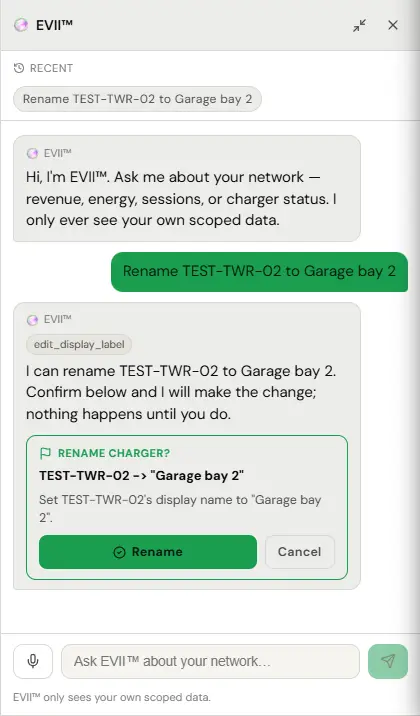
- Anything consequential is proposed, not done. She tells you what she is about to do and waits, for example a rename, a refund or deleting a charger.
- She cannot grant permissions. Not to you, not to anyone, not to herself. That is in the code rather than in her instructions.
Talk to her in normal sentences. You do not need to name a page or a field.
Status and faults
What is happening right now
What happened earlier
Money
What you earned
Working out a price
Drivers and access
Who is who
Changing things
Each of these she will propose and wait on. You confirm, she does it, and the audit log records that you asked.
Pricing and access
Hardware
Sites and people
By role and by job
Everything below is pulled straight out of the manual pages themselves, so it cannot fall behind them. The arrow goes to the page the prompt came from, where the click-path version sits next to it.
Operator and Property Manager
- Which locations do I have access to? →
- How many chargers am I responsible for in total? →
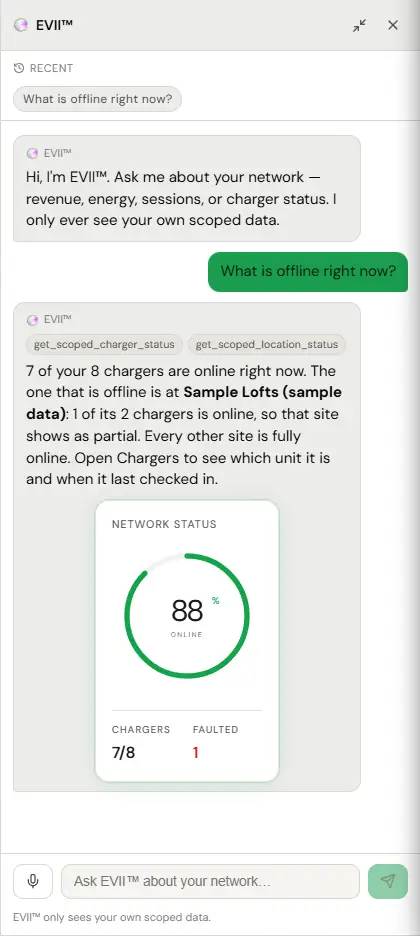
- What is offline right now? →
- Anything I should worry about at Balboa this morning? →
- Which chargers have not run a session in a week? →
- What did I earn last month across all sites? →
- Is anything stuck in payouts? →
- Export last month’s sessions for Balboa. →
- Set the visitor chargers at Balboa to 42 cents a kilowatt-hour. →
- What would I make per kilowatt-hour if I charged 45 cents? →
- Invite dana@example.com as a viewer. →
Building Admin
- How much energy did we deliver last month? →
- How many residents used the chargers in October? →
- Export last month’s sessions. →
- How many residents have joined the building? →
- Who charged here last week? →
Residential host
- How much did my charger earn this month? →
- Who charged at my house last week? →
- Close my charger to guests until Monday. →
- Set my guest price to 38 cents. →
- Open my charger to guests on weekdays from nine to six. →
- What am I actually keeping per kilowatt-hour? →
- Add sam@example.com to my free list. →
- Who is on my free list? →
- Block the driver who left their car plugged in overnight. →
- Give me the share link for my charger. →
- Take my charger off the public map. →
Fleet Admin
- How many drivers are on the fleet? →
- Who has not accepted their invite yet? →
- Who joined this month? →
- Add a driver to the fleet, I will send them the code. →
- Remove jordan@example.com from the fleet. →
- What did jordan charge in the last month? →
- Issue a keyfob to sam@example.com. →
- Which drivers have keyfobs? →
- Register the fob sam just tapped at the depot. →
- Sam lost their keyfob, kill it. →
- What does the fleet owe this month? →
- Is our payment method still good? →
Sales Partner
- How many chargers have I deployed? →
- Did the unit at 500 Wilson ever connect? →
- How many chargers have I deployed this year? →
- What rate is stamped on each of my chargers? →
- Which of my sites earned the most last month? →
- Which chargers I deployed have not run a session in thirty days? →
- What did I earn in commission last quarter? →
- Is my payout account finished, or is Stripe still waiting on something? →
Reports
- What did Balboa earn last month? →
- Show me energy delivered across every site in the last 90 days. →
- Which chargers had the lowest utilisation in October? →
- Export last month’s sessions for Balboa. →
- Send me the energy report for the quarter. →
- What did I earn last month across all sites? →
- Which charger made the most money this quarter? →
- How many unique drivers used Balboa in October? →
- Which chargers have not run a session in thirty days? →
- Is anything stuck in payouts? →
- Export last month’s sessions for Plymouth. →
- What was my uptime at Balboa last week? →
Connecting your bank
- Is my payout account finished, or is Stripe still waiting on something? →
- Has my payout account cleared? →
- When was I last paid? →
- What is pending in payouts? →
How we watch your chargers
- Reset the charger at Balboa. →
- Why did the Plymouth charger go offline last night? →
- Stop the session on charger 3 at Balboa. →
- Unlock the connector on the Plymouth unit. →
- Take charger 2 at Balboa out of service. →
- Put the Plymouth charger back in service. →
Join codes
What she will not do
- Grant permissions. To anyone, ever, including herself.
- Reach outside your scope. Another operator’s network does not exist as far as she is concerned.
- Act on something consequential without asking. She proposes and waits, every time.
- Reach a charger that is offline. Nor can we, nor can anyone. There is no connection to send a command down.
Every tool she reaches for on your behalf is logged, whether or not it went through. If she will not do something you think she should, that is worth telling us, because a boundary in the wrong place is exactly the thing we want to hear about.