
The business
Pricing
and money.
What you charge, what you keep, when it lands, and how to get the numbers out in a form an accountant will accept.
The split
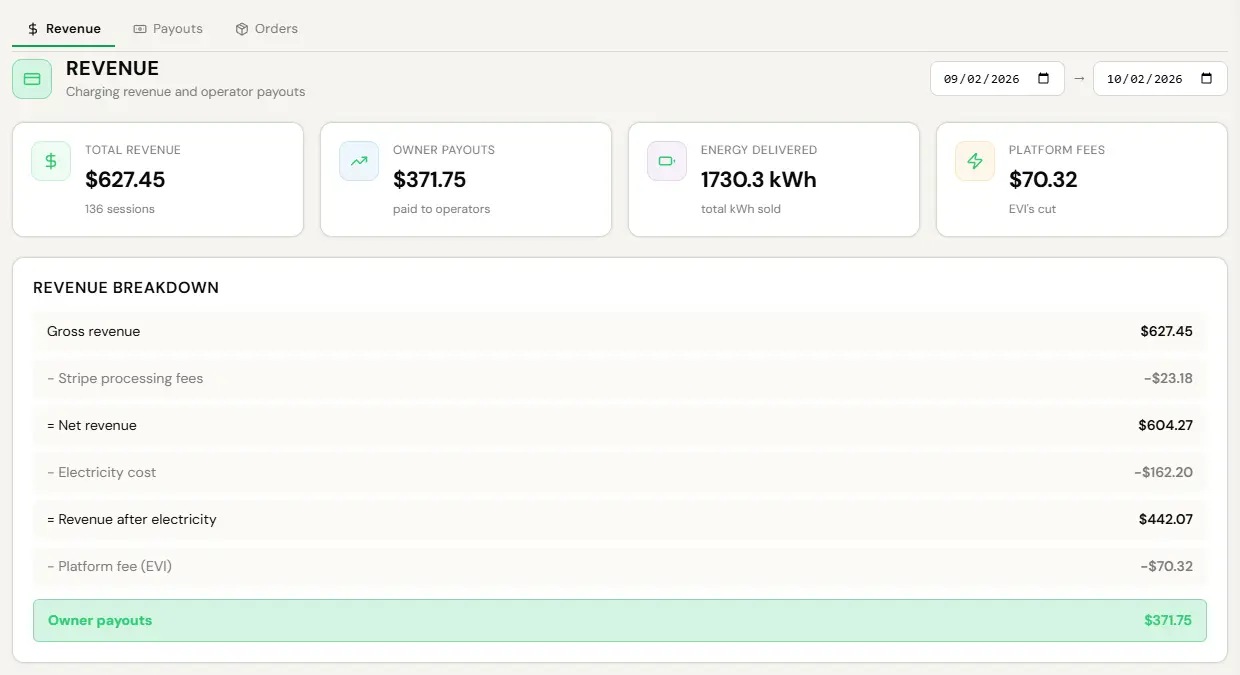
You keep 85%. We keep 15%. What the 85% is a percentage of depends on which kind of host you are, and there is a real reason for it rather than an accident.
| If you are | To run the charger | You keep |
|---|---|---|
| A homeowner who owns the charger and the property | Free | 85% of every kWh sold, before card processing |
| A resident who owns a plug in a building you do not run | Free | 85% of every kWh sold, before card processing |
| A building, hotel, retail site or workplace | $8 per charger per month | 85% of net, after card processing and electricity |
The residential basis is gross because the Host Program Terms say a host receives 85% of every kWh a guest buys, and that is the contract. We absorb the card fee out of our own 15%. On a very small session that costs us money, and it reverses at scale, which is a better problem than paying a host less than the terms promised.
A commercial site wrongly set to the residential basis and a resident wrongly set to the commercial one both move real money, in opposite directions, and neither throws an error. The boundary is enforced on every settlement, but if your payouts look unlike what you expect, this is worth checking before anything else.
Getting paid
The split is applied when a session settles and your share transfers to your own bank through Stripe Connect. Nobody invoices anyone. Nobody requests anything monthly.
- Money, Revenue tab, for totals and the breakdown.
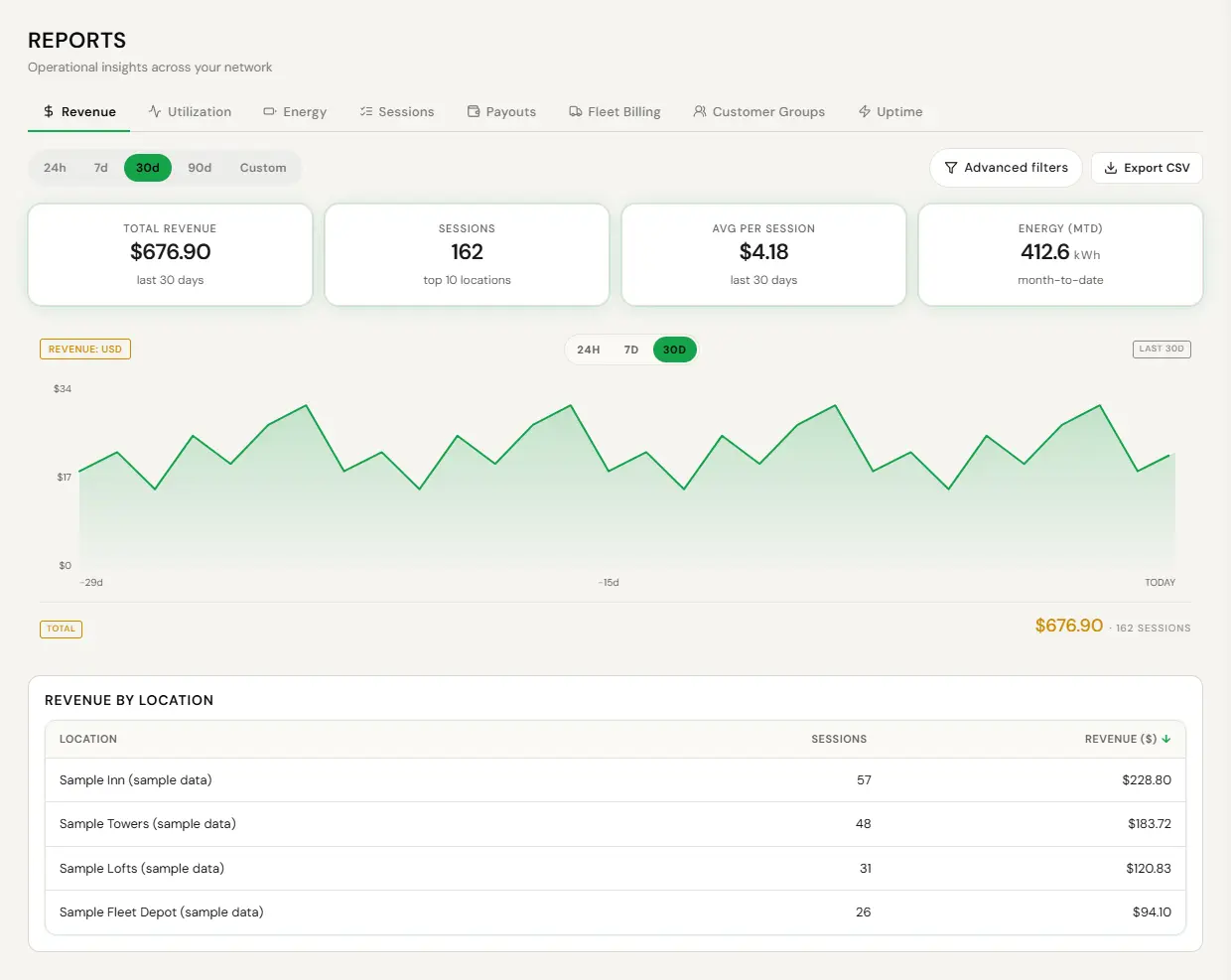
- Reports, Revenue for each site.
- The Payouts card under System, Settings for the payout account and its state.
A driver pays by card or from a preloaded wallet. A card session places a hold sized to what the charge could cost, captures the actual amount at stop, and releases the rest. A wallet balance is held with one operator and cannot be spent at another operator’s charger, and the app says so up front rather than failing at the end of a session.
Electricity reimbursement
Where a building pays for the electricity its chargers use and its agreement includes reimbursement, we pay it back: the kWh each session delivers, measured by the charger, times the per-kWh rate recorded for the site when the session starts. Per-kWh charges on the utility bill count. Demand charges and fixed meter or service charges do not, because the building pays those whether the chargers run or not. We reimburse at most 40 cents per kWh on a single rate, and 80 cents per kWh in a time-of-use period we have agreed to set.
The building’s bank account has to be connected within 60 days of launch, or electricity used before it connects is not reimbursed (how to connect it). We pay every quarter unless the platform shows another schedule. Dispute a rate or a meter reading within 90 days of the statement, and anything else within 12 months of the end of the period. The full rules are our Site Host Terms.
Refunds and disputes
- Sessions, find it, open it.
- Refund or adjust, with a reason.
- The reversal flows through the split the same way the original did.
A refunded session reverses its commission too, if the charger carries a Sales Partner commission. Everything unwinds the way it was applied.
When a driver disputes something, the message history is the record. Every OCPP message the charger sent or received is stored and searchable, so the question of what actually happened has an answer rather than two opinions.
Exports and reporting
- Reports, the Revenue or Sessions tab, filtered to the period you want.
- Use Export CSV. Each tab exports itself, in a format any accountant can open.
Every incentive, rebate, grant and tax credit stays with you. Not routed through us, not shared. That is in the contract rather than a policy that could change, and the metered session data those programs now require is already captured, because the platform bills by the kilowatt rather than estimating.
What you pay us
- $8 per charger per month, or $80 a year. A dual-port charger is one charger, so it is still $8.
- $4 per managed charger per month for load management, or $40 a year, only where your service needs it.
- Nothing for a homeowner or a resident who owns their charger.
- Every annual is ten months. Two free.
No additional platform percentage beyond the 15%. No charge for the app, the console, support or adding a site. Connection and idle fees, where set, are shown before charging. No setup fee, no minimum, no term.