Run the site

Power
and load.

Why twenty cars at 6pm does not trip your service, what a cap is, and the one failure mode worth knowing about.

The problem it solves

Twenty vehicles plugged in at six in the evening is more current than most buildings can supply. There are three ways that ends: somebody staggers it by hand forever, a breaker trips, or the site pays for an electrical upgrade it did not actually need.

Load management is the fourth. The platform shares what capacity exists across the chargers on a circuit, and lifts the limit again as demand falls. Nobody staggers anything and nothing trips.

It is proven, not theoretical

A car set to draw its maximum took only the cap the platform pushed. That is the whole promise: the limit is real at the hardware, not a suggestion in software.

Circuits

A circuit is a group of chargers that share an electrical supply. You tell the platform what that group is and what it can carry, and the sharing happens inside it.

Group chargers onto a circuit
Do it yourself
  1. Open the location, then circuits.
  2. Create a circuit and set its capacity.
  3. Add the chargers that share that supply.
Or just ask EVII™
Put the six garage chargers on one circuit at 100 amps.
Which chargers are on the same circuit at Balboa?

Get the capacity from your electrician or the panel schedule. It is the one number here you should not guess at.

The Circuits (1) section on the page for Sample Towers (sample data), seen by a test Tenant Admin, with an Add circuit button. A note explains that the control loop balances each Managed circuit’s chargers against its amp budget, that Loop load sums the caps last pushed, and that DLM bills per managed charger. The one row is Garage circuit (sample data): DLM budget 100 A, breaker 125 A class C, loop load 64 of 100 A, 2 chargers and a green Managed badge, with Chargers, edit and delete controls.
The Circuits section on a location’s page: each circuit’s DLM budget, breaker, loop load and chargers, with Add circuit. Sample screen with test data.
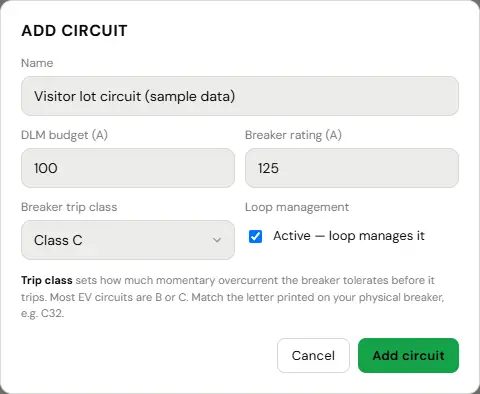
The Add circuit dialog opened from the Circuits section of a sample location by a test Tenant Admin. Name is Visitor lot circuit (sample data), DLM budget is 100 A, Breaker rating is 125 A and Breaker trip class is Class C, and the Loop management box Active, loop manages it, is ticked. A note explains that the trip class should match the letter printed on the physical breaker. Cancel and Add circuit buttons are at the bottom. Nothing was saved.
Add circuit: the name, the DLM budget in amps, the breaker rating and its trip class. Sample screen with test data.

Caps, and releasing them

When demand exceeds what the circuit can carry, the platform pushes a per-charger limit. When demand falls, it lifts it.

The interesting part is the second half. A limit that was applied has to be released, and a system that forgets is worse than one that never capped anything, because the site quietly delivers half the power it should and nobody knows why. So the obligation to release is recorded before anything is applied, a sweep retries every five minutes, and any cap still in force shows on the charger’s own page where you can see it.

Find a charger that is quietly capped
Do it yourself
  1. Open the charger page.
  2. Look for an Amperage cap card on the Overview tab.
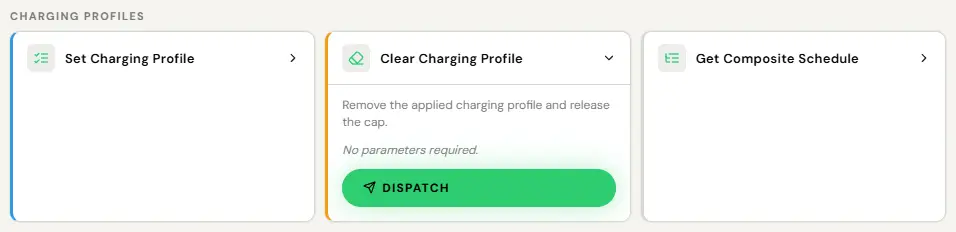
  3. If demand has dropped and it is still there, use Clear Charging Profile on the Commands tab.

Or just ask EVII™
Is anything still capped at Balboa?
Why is bay 4 charging slowly?
A warning card at the top of the Overview tab on the charger page for TEST-INN-01, titled Amperage cap with no owning circuit, showing 16 A. It says the charger is limited to 16 A by a charging profile the platform installed 6 days ago, with the date and time, and in bold: No circuit owns this cap. The circuit it came from was deleted or the charger was unassigned, so nothing will recompute or remove it on its own, and the charger keeps delivering 16 A until it is released. The last line says no release is queued yet, and to run the orphaned-cap migration or clear the cap by hand from the Commands tab.
A cap left behind shows as a warning card at the top of the charger’s Overview tab, with the amps it holds and how to release it. Sample screen with test data.
The Charging profiles group on the Commands tab of the charger page for TEST-TWR-02, seen by a test Operator. Set Charging Profile and Get Composite Schedule are collapsed; Clear Charging Profile is expanded: Remove the applied charging profile and release the cap. It needs no parameters and has an enabled Dispatch button. Nothing was dispatched.
Clear Charging Profile, in the Charging profiles group on the Commands tab, removes the applied profile and releases the cap. Sample screen with test data.

You can also set a cap deliberately on one charger, from the same place, without touching the panel. That is useful for a unit on a shared supply with something else, or a bay you want to slow down for a reason of your own.

What it costs

$4 per managed charger per month, or $40 a year, and only on the chargers that need it. If your service runs everything at full power at once, you do not need it and should not pay for it.

The comparison worth doing is not against nothing. It is against the electrical upgrade you would otherwise be quoted, which is usually a five figure number and several months.